


 Common Gates: AND, OR, NAND, NOR, XOR, XNOR
| Library: |
Gates |
| Appearance: |
By default, ANSI/IEEE 91a-1991 "shaped" symbols are used.
Alternative symbols are available as options under "International" in
Application Settings.
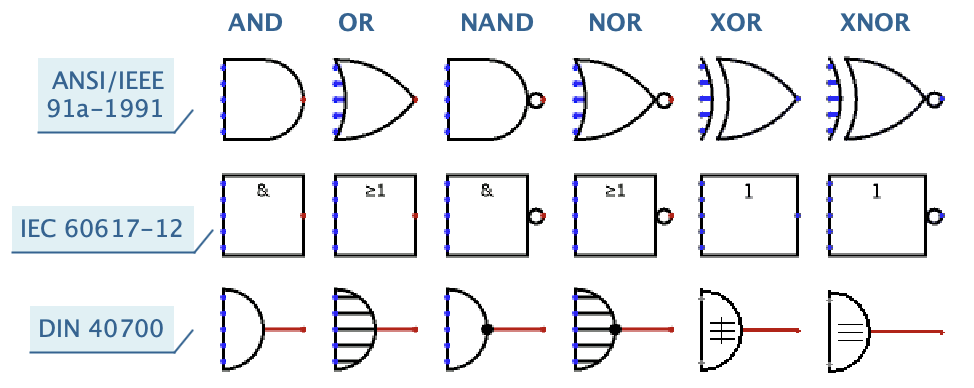 |
See Also:
Behavior
The common logic gates are: AND, OR, NAND, NOR, XOR, XNOR. Each one takes
several inputs, combines these using the rules of Boolean logic, and outputs the
result.
Gates can take up to 32 input bits (see Number of Inputs property).
All inputs are combined using the usual rules of Boolean logic to produce a
single output result. Use the Data Bits property to allow a gate to
operate on multiple bits simultaneously.
XOR & XNOR Multiple-Input Behavior Multi-input XOR and XNOR gates
can be confusing. Normally, XOR outputs a 1 when an odd number of inputs are
1, and XNOR does the opposite. This "parity" behavior is most typical. For XOR
and XNOR gates with more than two inputs, the multiple-input
behavior property allows for a different, less common behavior, where
XOR outputs a 1 when exactly one input is a 1, and XNOR does the opposite.
- AND Gate
- Unconnected inputs are ignored.
- If there are no connected inputs, outputs error (e).
- Outputs 1 when all connected inputs are 1 (and there are some connected inputs).
- Outputs 0 when any input is 0.
- In all other cases, outputs error (e). This includes cases where
some inputs are floating (z) or errors (e), unless some input is 0,
in which case the above rule applies and the output is 0.
- NAND Gate
- Outputs 1, 0, or e, whenever AND would have outputted 0, 1, or e, respectively.
- OR Gate
- Unconnected inputs are ignored.
- If there are no connected inputs, outputs error (e).
- Outputs 1 when any input is 1.
- Outputs 0 when all connected inputs are 0 (and there are some connected inputs).
- In all other cases, outputs error (e). This includes cases where
some inputs are floating (z) or errors (e), unless some input is 1,
in which case the above rule applies and the output is 1.
- NOR Gate
- Outputs 1, 0, or e, whenever OR would have outputted 0, 1, or e, respectively.
- XOR Gate with Multiple-Input Behavior set to "When an odd number are on"
- Unconnected inputs are ignored.
- If there are no connected inputs, outputs error (e).
- Outputs 1 when an odd number of inputs are 1, and all other connected inputs
are 0.
- Outputs 0 when an even number of inputs are 1, and all other connected inputs
are 0 (and there are some connected inputs).
- In all other cases, outputs error (e). This includes all cases where some inputs are
floating (z) or errors (e).
- XOR Gate with Multiple-Input Behavior set to "When one input is on"
- Unconnected inputs are ignored.
- If there are no connected inputs, outputs error (e).
- Outputs 1 when exactly one input is 1, and all other connected inputs
are 0.
- Outputs 0 when either zero or more than two connected inputs are 1, and all
other connected inputs are 0 (and there are some connected inputs).
- In all other cases, outputs error (e). This includes all cases where some inputs are
floating (z) or errors (e).
- XNOR Gate
- Outputs 1, 0, or e, whenever XOR would have outputted 0, 1, or e, respectively.
Errors, Unconnected, and Floating Inputs
- As a convenience, any input left unconnected is ignored: if there is no
wire or other connection to the input, the simulator acts as if the input
did not exist at all. So a 5-input gate with only two inputs connected
behaves just like a 2-input gate. This doesn't match physical circuits or
more realistic simulators, where such inputs would be considered
floating, but it makes editing a circuit a little more
forgiving.
- If all inputs are unconnected, the output is an error.
- If only one input is connected, the behavior depends on the gate type.
- If some inputs are errors, a gate's output is calculated from the
remaining inputs, but only the output would be unchanged even if the errors
were replaced by any combination of 0 and 1 values. For example, for an AND
gate, if any input is 0, then the output is 0, even if some inputs are
errors. Similarly, for an OR gate, if any input is 1, then the output is 1,
regardless of other inputs.
To enable a more strict simulation behavior, treating unconnected inputs as
floating values, see "Simulation" in Project
Options.
Keyboard Shortcuts
- Arrow keys change the Facing property for the selected gate or
gates.
- Typing a number (2-32) changes the Number of Inputs property
for the selected gate or gates.
- Typing a number (1-32) while holding the option key (⌥) or Alt key changes
the Data Bits property for the selected gate or gates.
Properties
Common multiple-input logic gates, AND, OR, NAND, NOR, XOR, XNOR, support these properties:
- Facing, with possible values: East, North, West, South
- Orientation of the output port.
- Data Bits, with possible values: 1-32
- Width of each input and output port. If set to N, the gate outputs
N values, with each output value computed from the corresponding bit of
the input ports.
- Gate Size, with possible values: Narrow, Medium, Wide
- Size of the gate symbol.
- Number of Inputs, with possible values: 2-32
- Up to 32 inputs are allowed. Unconnected inputs are ignored.
- Output Driver, with possible values: 0/1 (push-pull), 0/floating (pull-down-only), floating/1 (pull-up-only)
- Determines the set of possible output values, in other words, if the output
port is capable of actively driving high values, low values, or both.
See Live Circuit: Floating Buses
for demo.
- Label, with possible values: any text
- Text to be shown on top of the gate.
- Label Font, with possible values: any font
- Font for the label.
- Negate i, with possible values: Yes, No
- Whether to invert the value of input port i. Negated inputs are drawn
with a "bubble" symbol at the port.
- Multiple-Input Behavior, with possible values: When an odd number are on, When one input is on
- For XOR and XNOR gates with more than two inputs, chooses between
parity-style behavior and one-hot behavior.
- Negate x
- If
yes
, the input is negated before it is fed into the gate.
Inputs are counted from top-to-bottom if facing east or west,
and left-to-right if facing north or south.
Poke Tool Behavior
None - the common gates do not respond to being poked.
FPGA Synthesis
All common gates support VHDL and Verilog synthesis. Floating outputs
(selected with Output Value property) are not supported for
synthesis.