LED Bar
Found in Input/Output Library
Behavior
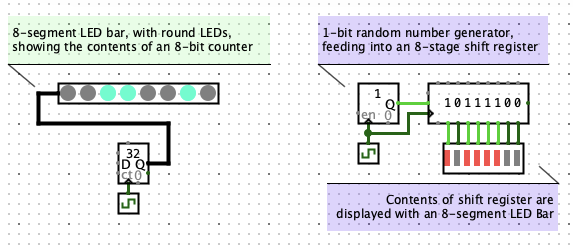
Displays a row of LEDs. Each LED lights up when its corresponding input is
active (as determined by the Active On High? property).
This is similar to the LED, but groups multiple LEDs
into a single component. It is especially useful for visualizing the bits of a
multi-bit value, such as the contents of a register or counter.
Ports
You can configure an LED Bar to have multiple inputs, one per LED, or a
single multi-bit input that controls all LEDs.
Keyboard Shortcuts
- Arrow keys change the Facing property.
- Arrow keys while holding the option key (⌥) or Alt key
change the Label Location property.
- Typing a number (1-32) changes the Segments property.
Properties
- Facing
- The direction the component faces. Changing this rotates the entire
component, including its ports.
- Input Format
- Whether to use one 1-bit input per LED (
separated
) or a single
multi-bit bus input (bus
).
- Segments
- The number of LEDs in the bar, from 1 to 32.
- Active On High?
- If
yes
, an LED lights up when its input bit is 1. If no
,
it lights up when its input bit is 0.
- On Color
- The color of a lit LED.
- Off Color
- The color of an unlit LED.
- LED Shape
- Whether LEDs are
rectangular
or round
. Rectanglular LEDs are packed more tightly.
- Label
- Text label displayed near the component.
- Label Location
- Which side of the component the label appears on.
- Label Font
- The font used to draw the label.
- Label Color
- The color used to draw the label.
Poke Tool Behavior
None — the LED Bar does not respond to being poked.
FPGA Synthesis
Supports VHDL and Verilog synthesis.