RAM
RAM
RAM
RAM| Library: | Memory | |||||||
| Introduced: | 2.0 Beta 1 | |||||||
| Appearance: |
| |||||||
The RAM component, easily the most complex component in Logisim's built-in libraries, stores up to 16,777,216 values (specified in the Address Bit Width property), each of which can include up to to 32 bits (specified in the Data Bit Width property). The circuit can load and store values in RAM, either one at a time, in pairs, or four at a time. Also, the user can modify individual values interactively via the Poke Tool, or the user can edit, export, or import the contents via the Menu Tool.
Current values are displayed in the component. Addresses are shown in hex to the left of the display area, and memory contents are shown in hex inside the display area. The value at the currently selected address is displayed with a dark highlight and white text.
The RAM component supports two different interfaces, depending on the Databus implementation property.
The component includes a single port on its east side that serves for both
loading and storing data. Which operation is performed—loading or
storing—depends on the inputs labeled
L and S: L=1 (or floating) indicates to load (from RAM to the data bus) the data at the address
designated on the component's west side, and S=1 indicates to store (from the data
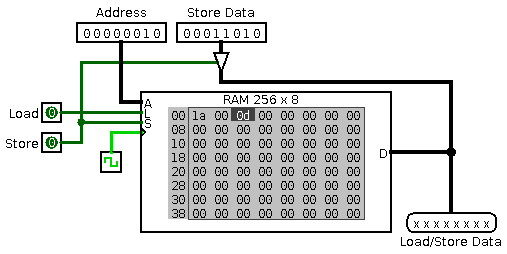
bus to RAM) the data given on the port into the given address. To transmit data into and out of the component in both
directions on a single bus wire, you will need to use a  Tri-State Buffer, as illustrated in the
example below, or other components that support floating outputs (e.g.
components that have an 'Output Value' property with support for floating
outputs).
Tri-State Buffer, as illustrated in the
example below, or other components that support floating outputs (e.g.
components that have an 'Output Value' property with support for floating
outputs).
Two data ports are provided—one input data port on the west side for storing data into RAM, and a separate output port on the east side for loading data from RAM. This style of data interface removes the necessity of dealing with the Tri-State Buffers and so it generally easier to use. With this interface, the output port will always be enabled, and there is no L control port: effectively, the RAM will load values to the output databus on every cycle. The S control port controls whether data is stored.
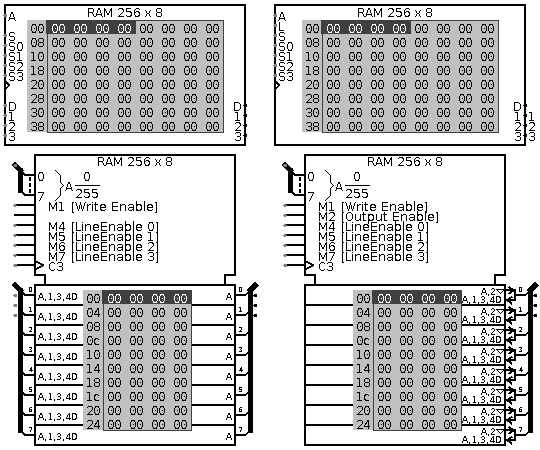
Logisim RAM has a 'Line Size' property that controls how many locations ("lines") of memory are accessed at a time. Setting 'Line Size' to 'Single' is the simplest case: at most one location is accessed during each clock cycle, and there is one databus labeled D (either a single bidirectional port, or a pair of one input and one output port both labeled D). When 'Line Size' is set to 'Dual', however, the RAM component can read or write up to two locations simultaneously, and there are two databuses (either two bidirectional ports, or two pairs of unidirectional ports), labeled D and 1. In 'Quad' mode, RAM will read or write up to four locations, with four databuses labeled D, 1, 2, and 3. The addresses accessed are all consective: for 'Dual' line mode, RAM will access addresses A and A+1; for 'Quad' line mode, RAM will access addresses A, A+1, A+2, and A+3.
In 'Single' line mode, the single input S controls whether a store operation is performed for the given address. In 'Dual' and 'Quad' line modes, there are additional inputs to control which bytes (if any) are stored during a store operation. For example, in 'Quad' mode, there are control signals labeled S0, S1, S2, and S3, which control whether a store is performed for addresses addresses A, A+1, A+2, and A+3, respectively.
In 'Dual' and 'Quad' line modes, the selected address must be aligned to a multiple of 2 or 4, respectively. There is no support for mis-aligned accesses. This means the lowest bit or lowest two bits of the address must always be zero in those modes. If the address is mis-aligned, RAM will not store data, and it will output all error (E) values instead of loading data from the RAM contents.
The decision to omit support in Logisim for mis-aligned addresses is deliberate. Support for mis-aligned addresses is not trivial in many actual scenarios: a memory chip may require multiple row accesses, for example, in order to perform a mis-aligned read. In addition, FPGA synthesis is substantially simpler when mis-aligned addresses are not permitted.
When the component is selected or being added,
the digits '0' through '9' alter its Address Bit Width
property
and Alt-0 through Alt-9 alter its Data Bit Width
property.
rising edgeindicates that the memory should store values at the instant when the clock rises from 0 to 1. The
falling edgevalue indicates that it should update at the instant the clock falls from 1 to 0. The
high levelvalue indicates that the memory should update continuously whenever the clock input is 1. And the
low levelvalue indicates that it should update continuously when the clock input is 0.
Clicking the RAM component brings keyboard and mouse focus to the RAM (indicated by a red rectangle), allowing for the contents to be viewed or edited. Because Poke Tool editing all takes place within a very small space, the interface for this is severely but necessarily constrained. For all but the simplest editing, it is more convenient to right-click the RAM and select "Edit Contents..." to bring up the integrated hex editor.
The Poke Tool has two modes of operation: You can edit the address displayed, and you can edit an individual value at some memory location.
Editing Addresses: Use the Poke Tool and click anywhere within the memory component but outside the gray box holding the memory contents. Logisim will draw a red rectangle around the address at the upper left corner. From here:
Typing R or r will clear the contents of memory.
Typing hex digits will change the address (assuming the new address isn't too large) and scroll the memory contents to show that address.
Scrolling with the mouse wheel increments or decrements the address and scrolls the memory forward or backward.
The Down (or Enter) key will increment the address and scroll the memory contents forward by one row.
The Up (or Backspace or Delete) keys will also increment or decrement the address to key will decrement the address and scroll the memory contents backwards by one row.
The Page Down (or Space) and Page Up keys will increment or decrement the address to scroll the memory contents forward or backward by one full page.
Editing Contents: Use the Poke Tool and click anywhere within the memory component within the gray box holding the memory contents. Logisim will draw a red rectangle around the memory cell currently being edited. From here:
Typing R or r will clear the contents of memory.
Typing hex digits will change the contents of that cell.
Scrolling with the mouse wheel moves up or down to an adjacent memory cell.
The Up, Down, Left, and Right arrow keys move to an adjacent memory cell.
The Page Up and Page Down keys move up or down by a full page.
The Backspace (or Delete) and Tab (or Space) keys similarly move to the previous or next memory cell.
Right-clicking the RAM component brings up several actions in a context menu:
Edit Contents...: Brings up the integrated hex editor to view and edit the entire memory contents in a separate window
Clear Contents: Resets all values in memory to all zeros.
Load Memory Image...: Loads entirely new memory contents by importing from a file. A variety of file formats are supported: see Memory Import/Export Format in the User's Guide for details.
Save Memory Image...: Saves the entire contents of memory to an external file. A variety of file formats are supported: see Memory Import/Export Format in the User's Guide for details.
Supports VHDL synthesis. Only rising and falling edge triggers are supported. Non-Volatile memory is only supported on Altera devices. Only the "separate data bus" interface option is supported for synthesis.