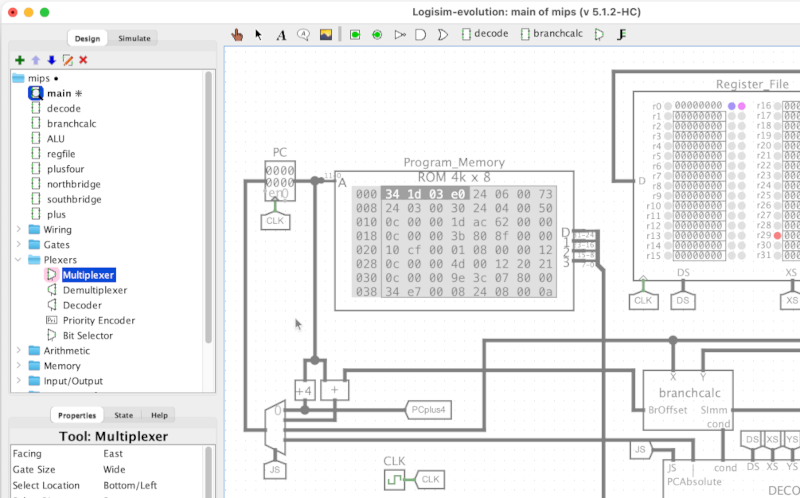
Logisim comes with the following built-in components, visible in the left
sidebar of each project. These can also appear in the toolbar. You can add
additional libraries to your project using Project > Load Library,
including third-party libraries found online, and you can even write your own
custom jar library or use import one project file into another to be used as a
custom .circ library.
| Wiring library — Basic elements needed for most circuits |
|---|
 |
Split/Join Signals — join signals into buses, or split busses into separate signals |
  |
Input & Output Pin — input to and output from a circuit |
 |
Probe — display values on wires |
 |
Tunnel — make connections without drawing wires |
 |
Clock — oscillates between zero and one |
  |
Constant — like an input, but with a fixed value |
   |
Extend/Truncate — zero-extend, sign-extend, or truncate a value |
| Gates Library — Primitive combinational components |
|---|
 |
NOT Gate — inverts a signal |
 |
Buffer — does nothing, no-op |
 
 
  |
AND, OR, NAND, NOR, XOR, XNOR Gates — common logic operations |
  |
Odd Parity, Even Parity — parity operations |
  |
Tri-state Buffer, Tri-state Inverter — gates with three possible outputs |
 |
PLA — Programmable Logic Array |
| Plexers Library — controlling and selecting groups of signals |
|---|
 |
Multiplexer — select one value from of a group of wires |
 |
Demultiplexer — send a value to one of a group of wires |
 |
Decoder — enable one out of a group of wires |
 |
Priority Encoder — check which wire among a group is enabled |
 |
Bit Selector — select one bit from a bus |
| Arithmetic Library — computing with binary numbers |
|---|
 |
Adder — add binary numbers |
 |
Subtractor — subtract binary numbers |
 |
Multiplier — multiply binary numbers |
 |
Divider — divide binary numbers |
 |
Negator — negate two's complement binary numbers |
 |
Comparator — compare binary numbers |
 |
Shifter — shift binary patterns left or right |
 |
Bit Adder — count the enabled bits in a bus value |
 |
Bit Finder — search for a bit in a bus value |
| Memory Library — storing data |
|---|
 
  |
D, T, J-K, S-R Flip-Flops — store a single-bit |
 |
Register — store multiple bits |
 |
Counter — store, increment, and decrement a number |
 |
Shift Register — store and shift a bit pattern |
 |
Random Generator — generate random numbers |
 |
RAM — random-access memory |
 |
ROM — read-only memory |
| Input/Output Library — user interaction |
|---|
 |
Button — a push-button for user input |
 |
DIP Switch — a row of small switches for user input |
 |
LED — single-bit output as a colored light |
 |
LED Bar — a row of LEDs for displaying multi-bit values |
 |
RGBLED — three-bit output as a multi-colored light |
 |
7-Segment Display — display numbers or patterns |
 |
Hex Digit Display — display 4-bit data as a hex digit |
 |
Meter — displays a value on a analog-style meter or dial gauge |
 |
Slider — user input using a linear or log-scale slider |
 |
Dial — user input using a linear or log-scale dial |
 |
Dial — output to an oscilloscope-style display |
 |
Joystick — arcade-style joystick for x,y user input |
 |
Keyboard — ascii text user input |
 |
TTY — display ascii text |
 |
Port I/O — bi-directional input/output (useful for FPGAs) |
 |
File Viewer — display lines from a file |
 |
Slideshow — chooses and displays an image depending on a control signal |
 |
LED Matrix — a grid of 1-bit lights |
 |
RGB Video — full-color video output |
| Analog Library — simplistic non-digital components |
|---|
  |
Power, Ground — signal source and sink |
  |
Transistor — simplified PNP and NPN transistors |
 |
Transmission Gate — block or transmit a signal |
 |
Pull Resistor — weakly pull signal to a default value |
| Audio Library — digital audio |
|---|
 |
Octave — a simulated piano keyboard for generating audio |
 |
PCM Sink — converts circuit-generated PCM data to audio output |
|
MIDI Sink — converts circuit-generated MIDI data to audio output |
 |
MIDI Input — connects an external source of MIDI data to a Logisim circuit |
 |
Saturating Adder — addition using scaled, saturating, or normalized arithmetic |
 |
Saturating Subtraction — subtraction using scaled, saturating, or normalized arithmetic |
 |
Saturating Negator — negation using scaled, saturating, or normalized arithmetic |
 |
Saturating Multiplier — multiplication using scaled, saturating, or normalized arithmetic |
 |
Saturating Divider — division using scaled, saturating, or normalized arithmetic |
 |
Requantizer — scale and normalize values |
|
Linear Map — shift values between preset ranges |
 |
Scaled Math & Trig — evaluate mathematicaal and trigonometric expressions with scaled arithmetic |
 |
Line Select — select or mix values from among multiple inputs |
| BFH mega functions — miscellaneous advanced components |
|---|
 |
Dynamic Clock Control — control FPGA clock speed dynamically |
 |
Timed Pulse — generate pulses at a known, fixed rate |
 |
Bin2BCD — binary to binary-coded-decimal conveter |
|
BCD2SevenSegment — 4-bit binary-coded-decimal to seven-segment adapter |
|
Hex2SevenSegment — 4-bit hex to seven-segment adapter |
| External I/O — a portal to the world outside the simulation |
|---|
 |
Serial Input — get realtime data from USB and other serial devices |
 |
Http Input — get realtime data from the web |
 |
Real Time Clock — get realtime time and date data |
| Decor Library — decorative elements |
|---|

  |
Plain & Styled Comment — add text blocks to comment a circuit |
 |
Callout Tool — add callouts for highlighting specific features of a circuit |
 |
Image Tool — add images to document your circuit |
 |
Hyperlink — add a button linking to a web page |