Random
Random
Random| Library: | Memory | |||
| Introduced: | 2.3.0 | |||
| Appearance: |
|
This component iterates through a pseudorandom sequence of numbers, which steps forward to the following number in the sequence each time the clock is triggered while the component is enabled. Technically speaking, the algorithm used to compute the pseudorandom sequence is a linear congruential generator: Starting from a seed r0, the following number r1 is the number
The next value r2 is computed from r1 using the same computation, and so forth. This sequence is of 48-bit numbers; the value seen from the component is the low-order bits as configured by its Data Bits property, after first throwing out the lower 12 bits of the current seed.
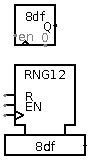
Besides the clock input, the component also includes an enable input, which leads the clock input to be ignored when enable is 0, and the reset input, which resets the component's value asynchronously to the initial seed r0.
The initial seed is user-configurable. If it is configured at 0 (which is the default), then the seed is based on the current time; when instructed to reset through the reset input, the component computes a new seed based on the new current time.
When the component is selected or being added,
Alt-0 through Alt-9 alter its Data Bits
property.
rising edgeindicates that the component should update its value at the instant when the clock rises from 0 to 1. The
falling edgevalue indicates that it should update at the instant the clock falls from 1 to 0.
When using "Classic Logisim" appearnce, clicking within the component will generate a new random number, advancing the value stored by one step in the sequence of random numbers. Pressing Backspace or Delete will reset the state using the initial seed.
Supports VHDL and Verilog synthesis.