
 Input & Output Pin Input & Output Pin
Found in Wiring Library

Pins act as inputs to, or outputs from, a circuit. Input pins have squared corners, output pins are rounded.
Pins are interactive: you can poke an input pins to change the value they send into your circuit, and output pins can't be poked but instead always display the value coming from your circuit, or if there is no value to display, output pins show a 'z', the standard notation for "floating" or "no specific value". When used interactively, a 1-bit input pin behaves much like a Button, and a 1-bit output pin behaves similarly to an LED. Unlike Buttons and LEDs, the colors of pins can't be customized. But pins can carry multiple bits, and display their values numerically in your choice of format (binary, signed decimial, hexadecimal, etc.), features not available for Button and LED.
Pins enable subcircuits: When one circuit is embedded as a subcircuitwithin another, pins are how values traverse between the outer and the inner circuits. The outer circuit sends data into the inner circuit's input pins, and inner circuit's output pins feed data back to the outer circuit. No other component has this ability: a Button inside the inner circuit, for example, can't be poked or driven by signals from the outer circuit, and an LED inside the inner circuit can't affect or be seen from the outer circuit. (But see dynamic subcircuit appearance for an advanced technique allowing more flexibility when designing subcircuits.)
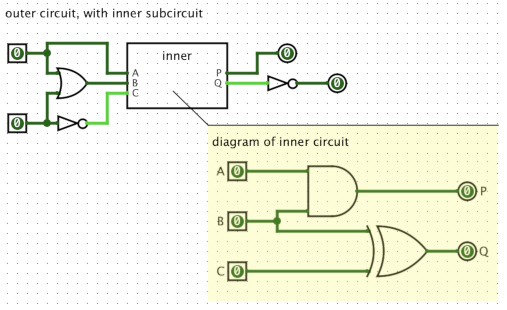
Each pin has a single port. For input pins, the port carries the input value. For output pins, the signal at this port becomes the output.
Normally, 1-bit pins show color-coded binary values, '0' or '1'. Pins show 'z' to indicate a floating value (for example, if an output pin isn't connected to a wire, or is connected to a wire that doesn't carry any value). In cases of errors, pins become red, and output pins show 'E'.
Multi-bit pins show values in numeric form, but don't show colors. They can be configured to show binary, hexadecimal, octal, signed decimal, or unsigned decimal. The symbols 'z' and 'E' are also used to indicate floating values and errors for multi-bit pins.
In printer view, or when exporting to image format, pins normally display their width, instead of showing a value.
Input pins are interactive components. For a standalone or top-level circuit,
use the  Poke Tool to change the value of an
input pin: each poke with toggle between '0' and '1', or if the Radix is
not binary, poke will cycle through the possible values or open an input box to
enter a value.
Poke Tool to change the value of an
input pin: each poke with toggle between '0' and '1', or if the Radix is
not binary, poke will cycle through the possible values or open an input box to
enter a value.
When viewing the state of a subcircuit, part of some larger circuit simulation, input pins values are "tied" to the outer circuit, so the poke tool can't change the values.
When viewing an "inner" simulation, if you poke an input pin, a notice will appear warning that the pins are "tied," or linked, to the outer circuit and can't be changed. The notice window also gives you the chance to break this link by creating a new standalone simulation where you will be able to modify the input pin values. See debugging subcircuits for more info.
When the Behavior property for an input pin is set to Simple (the default), the pin will normally send either a '0' or '1' into a circuit, at all times (or, for a multi-bit input, a pattern of zeros and ones). But this isn't quite true.
An outer circuit might have a mistake causing an error signal to appear at the input pin. Or, a wire in the outer circuit that connects to the input pin might not be driven by any components, leaving the value floating, with a 'z' value appearing at the input pin. As a special case: if the outer circuit doesn't have any connections to the pin, logisim uses a default value of '0' for the pin. In other words, a Simple input pin will pass along a floating value from a connected wire in an outer circuit, but will never "create" a floating value via the poke tool or because there is no connected wire in the outer circuit.
This special case for Simple — using '0' for the value of a completely-unconnected subcircuit input pin — can be confusing, and can lead to subtle mistakes. If you accidentally miswire the outer circuit, or forget to connect something to the subcircuit input, you may not notice the mistake, as it will be treated as if it were '0'. This behavior is also inconsistent with reality. The advanced behaviors (described below) are a better option, and this special case was probably not the best idea. Nevertheless, the special case is retained for backwards compatibility with older logisim circuits.
The Behavior property allows other options than the Simple behavior described above:
These three options match more closely the behavior of FPGA devices and other physical circuits.
When using Poke Tool: If an input pin has a single-character label, type that character to poke the pin and change it's value.
When using Edit Tool:
Clicking an input pin with the poke tool will change the value it contains.
Output pins do not respond to being poked.
Supports VHDL and Verilog synthesis.