 Poke Tool Poke Tool
Found in Mouse Tools
The Poke Tool is for interacting with a circuit: use the mouse and keyboard to probe values, change inputs, edit values stored in registers and memory, and prod other components to change state or perform actions.
Live Circuit: Interaction using input and poke tool
Many components respond to being poked:
 Button,
 DipSwitch, or
 Joystick
to change it's value.
Joystick
to change it's value. Input Pin
to toggle its value, or poke a decimal or hex input pin then type enter new
values.
Input Pin
to toggle its value, or poke a decimal or hex input pin then type enter new
values. Register,
 Counter,
or other memory component then type to modify the values stored within.
Counter,
or other memory component then type to modify the values stored within. Clock,
repeatedly, to make it tick.
Clock,
repeatedly, to make it tick. Embedded Subcircuit
(double-click the magnifying glass
Embedded Subcircuit
(double-click the magnifying glass  that appears) to open and inspect its internal circuit.
 Hyperlink
component, or links in
Hyperlink
component, or links in
 styled text block comments
to open the URL in a browser.
styled text block comments
to open the URL in a browser.For some pokable components, like
multi-bit Registers,
hex or multi-bit Input Pins,
the mouse and keyboard must be used in combination: poke the component to select
it, then type to enter hex or other data.
Poking things with the mouse can be tiresome, especially for circuits with several inputs or buttons. You can enable easy keyboard interaction in your circuits: just label any component with a one-letter name. Then, when using the poke tool, typing the letter will poke that named component, just as if you had clicked it. This only works if you haven't already selected some component that expects keyboard input. Case does not matter here, 'a' and 'A' are treated the same.
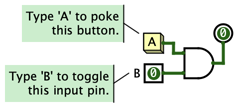
You can even name several components with the same hotkey, typing it will poke them all. This kind of keyboard interaction is most useful with buttons and one-bit input pins.
Note: Poke is for interaction, not editing. While the poke tool is active, you can't move components, draw wires, drag-to-select components, or do most other editing-related actions. Those require theEdit Tool.
There are some exceptions. When you poke a component, its properties are
shown in the lower left panel, and you can still edit properties there while
still keeping the poke tool active. If you paste some previously-copied
components while the poke tool is active, Logisim automatically switches to the
Edit Tool
so you can place the pasted components.