 Edit Tool Edit Tool
Found in Mouse Tools
The Edit Tool is the main way to edit circuits, allowing you to select and
rearrange existing components, and to add, move, and rearrange wires. It is a
flexible tool with many features and actions depending on where you click, and
which modifier keys you press. In effect, Edit Tool is hybrid combination of
 Move Tool and
 Wiring Tool,
which are simpler single-purpose editing tools.
Wiring Tool,
which are simpler single-purpose editing tools.
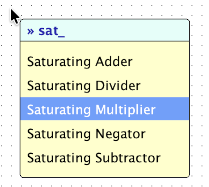
Adding components with type-to-search: Just start typing the name of the component you want to insert, and a list of matching components from your project will appear. Hit Enter to insert the chosen component, or Escape to cancel. Tab to auto-complete up to the longest common prefix.
Draw wires from components: When the mouse is hovering over a component wiring port, a small colored circle is shown. Click and drag to draw a new wire from that port. Or, just hover over a component's input or output ports to see a description of the port.
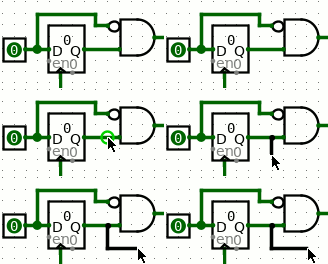 Draw wires from wires: When the mouse is atop a wire or bus, a small
colored circle is shown. Click and drag away from the wire to draw a new
branch from that spot. If holding the Alt or
Option key, this behavior is disabled, and a click will
select or move the wire segment instead.
Draw wires from wires: When the mouse is atop a wire or bus, a small
colored circle is shown. Click and drag away from the wire to draw a new
branch from that spot. If holding the Alt or
Option key, this behavior is disabled, and a click will
select or move the wire segment instead.
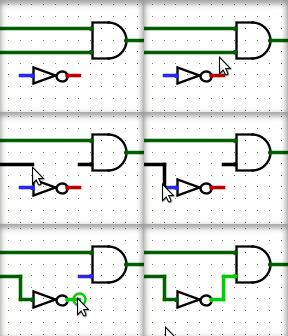 Edit existing wires: Click and drag the end of a wire to shorten or extend it, or click and drag
the middle of a wire segment and drag along the wire to open a gap.
Edit existing wires: Click and drag the end of a wire to shorten or extend it, or click and drag
the middle of a wire segment and drag along the wire to open a gap.
All wires in Logisim are either horizontal or vertical, never diagonal, but logisim will create an "L" shaped sequence of wire segments if you drag diagonally. You can control the orientation of the "L" with mouse movement: if the drag starts horizontally, the first segement will be horizontal, for example.
Tip: Press Space while dragging to bend a wire's path.. You can do this repeatedly to make a complicated zig-zag path for the wire by pressing Space at each place the wire should turn a corner. Press Backspace while dragging to straighten a wire's path. Each Backspace will remove a corner point, resulting in fewer turns and a more direct path. Press Escape to cancel wire drawing.
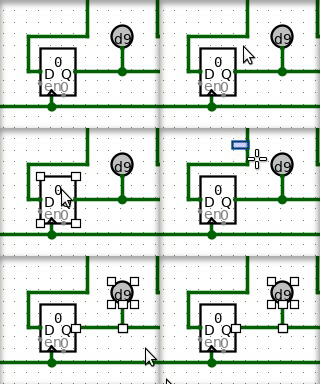 Select items: A plain click on wire or a component, without dragging,
will select the component or one wire segment. Holding
shift while clicking an item will add it to the
selection (or, if it was already selected, remove it from the selection). After
selecting items, familiar actions like cut, copy, delete, and duplicate all
work. See Edit menu for
details.
Select items: A plain click on wire or a component, without dragging,
will select the component or one wire segment. Holding
shift while clicking an item will add it to the
selection (or, if it was already selected, remove it from the selection). After
selecting items, familiar actions like cut, copy, delete, and duplicate all
work. See Edit menu for
details.
Select area: Click then drag on the background grid to begin a rectangular selection. All components that are fully contained by the rectangle will be selected. Holding shift while making a rectanglar selection will add the new elements to the selection if they were not there already, or will remove them if they were.
Move things: Clicking and dragging a currently-selected component
or wire segment will begin moving everything selected. By default, Logisim will
attempt to fix wires so that existing connections are not lost during the move.
If you're performing a move where you do not want to keep the connections, press
shift during the move and when releasing the mouse
button. If you want to change this behavior, go to Project > Options, select
the Canvas tab, and uncheck the Keep Connections When Moving
box; with
that option unchecked, shift key behavior is reversed:
wires are not reconnected unless the shift key is
held.
Tip: When moving one or more Decorative components, without any other items, the normal snap-to-grid behavior is not enfoced: these components have no wires or ports, so they may be placed anywhere on the canvas. If you want to align them nicely to the grid, hold the shift key while moving them. For all other components, snap-to-grid is required, so shift affects only wire re-connection behavior.
When components are selected, there are several ways to edit them:
When a component is selected, you can edit its properties in the lower left panel. With multiple components selected, properties shared by all are shown in that panel. Each property shows a value if all components share that same value, or is left blank otherwise. Changing these properties affects all selected components.
Tip: Many components also respond to hotkeys to change their properties when they are selected. For example, select one or a few gates, then type a number — this changes the number of inputs for each gate. Or hold Alt or Option and type a number to change the `Bit Width' of their inputs and outputs. See each component's reference page for details on how they respond to hotkeys.
Ghosts or floating selections: When duplicating or pasting components, Logisim does not immediately place the new components into the circuit; instead, the selection will be a collection of "ghosts" hovering above the circuit. These are dropped into the circuit as soon as they are either deselected or dragged to another location.