 Wiring Tool
Wiring Tool
Wiring Tool| Library: | Mouse Tools |
| Introduced: | 2.0 Beta 1 |
The wiring tool is for creating wire segments that carry
values from one endpoint to another. It behaves similarly to wires. It behaves
similarly to the  Multi-Tool, except that it does not select
components, it only adds new wires and modifies existing wires.
Multi-Tool, except that it does not select
components, it only adds new wires and modifies existing wires.
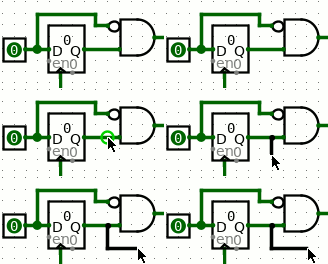 Clicking and dragging anywhere on the canvas will create a new wire or modify an
existing wire segment. Wires in Logisim are either horizontal or vertical, never
diagonal, but logisim will create an "L" shaped sequence of wire segments for
you if you drag diagonally.
Clicking and dragging anywhere on the canvas will create a new wire or modify an
existing wire segment. Wires in Logisim are either horizontal or vertical, never
diagonal, but logisim will create an "L" shaped sequence of wire segments for
you if you drag diagonally.
Hint: Press space while dragging to bend a wire's path.. You can do this repeatedly to make a complicated zig-zag path for the wire by pressing space at each place the wire should turn a corner. Press backspace while dragging to straighten a wire's path. Each backspace will remove a corner point resulting in fewer turns and a more direct path.
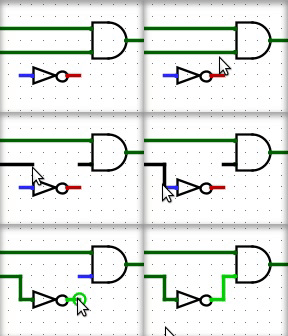 Click and drag the end of a wire to shorten or extend it, or click and drag
the middle of a wire segment and drag along the wire to open a gap.
Click and drag the end of a wire to shorten or extend it, or click and drag
the middle of a wire segment and drag along the wire to open a gap.
Click and drag on a blank area of the canvas to start a completely new wire.
Hover over the wiring point of a component to see a description of that input or output.
Some components draw short stubs near the points to which wires can connect, such as the OR gate and controlled buffer. Logisim will silently correct attempts to create wires that slightly overshoot the stub's end.
The wiring tool does not itself have attributes, but the wire segments that it creates do.